Added in v2.6.0← Back to Table of Contents
Summary
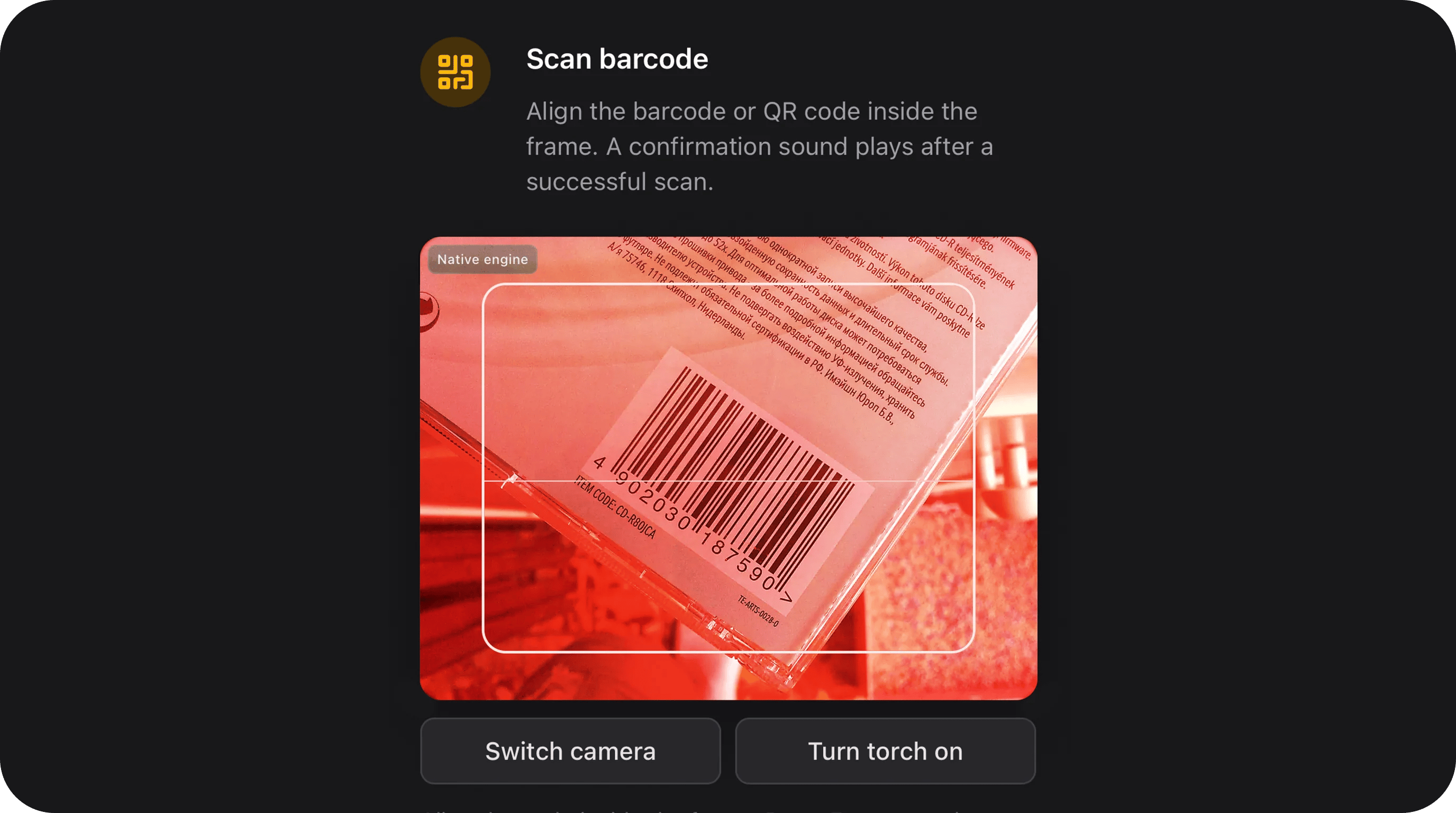
Barcode and QR input on the FlexTextInput shell with a Filament modal camera scanner, optional manual typing, format whitelist, and EAN/UPC checksum validation. Uses a hybrid scan engine: nativeBarcodeDetector when the browser supports it (Chrome/Edge), with automatic ZXing fallback. On a successful scan the field fills the input, plays a confirmation sound, and closes the modal (unless continuous() is enabled).
Basic usage
State format
The field stores a plain string (ornull when empty). Whitespace is trimmed on hydrate/dehydrate.
Supported formats
Configure allowed symbologies withformats() or supportedFormats(). When omitted, all built-in formats are allowed.
Invalid checksum example (EAN-13):
5901234123450.
Limit formats to specific symbologies
Yes — pass only the formats you need. The whitelist is applied in three places:- Camera engine — BarcodeDetector / ZXing hints (what the camera tries to decode).
- Client validation — rejects scans that do not match allowed patterns before accepting.
- Server validation —
BarcodeValidatoron form submit.
EAN / UPC only (retail)
QR only
Warehouse — Code 128 + ITF
Dynamic whitelist (Closure)
Format detection
There are two layers:
Important:
- By default state is a string (value only). Enable
storeDetectedFormat()to persist{ value, format }from the camera engine. - Server-side matching is heuristic (e.g. 13 digits → EAN-13). Ambiguous strings may match the first allowed format in priority order (EAN before QR).
BarcodeFormat::Qris the widest pattern — avoid combining it with numeric formats if you rely on manual typing.validateChecksum()adds real modulo-10 verification for EAN/UPC (recommended for retail).
Scan UX
Default flow (withoutcontinuous()):
- User clicks scan button → Filament modal opens.
- Camera starts after the modal transition (badge shows Native engine on desktop Chrome/Edge or ZXing engine on mobile).
- On valid scan → input filled, confirmation beep (when
beepOnScan()is on), modal closes immediately. - Toolbar below the preview — Switch camera and Turn torch on/off (when supported); not overlaid on the video.
- On mobile, switch camera toggles front ↔ rear via
facingMode; on desktop, cyclesMediaDeviceInfowhen multiple inputs exist. - When
pauseWhenHidden()is on (default), decoding pauses while the browser tab is in the background to save battery.
continuous() — modal stays open for inventory-style scanning; input updates on each successful read.
Mobile / iOS notes
Configuration API
All methods acceptClosure for dynamic configuration.
placeholder(string|Closure|null $placeholder)
Inherited from Filament HasPlaceholder. Default translation: filament-flex-fields::default.barcode_scanner.placeholder.
readOnly(bool|Closure $condition = true) / disabled(bool|Closure $condition = true)
Inherited from Filament CanBeReadOnly. Read-only keeps the scanned value visible but blocks manual edits and opening the scanner modal.
focusOutline(bool|Closure $condition = true)
Inherited from HasFieldFocusOutline. Default: false. When true, shows the shared focus ring on the FlexTextInput shell.
Public helper methods
Standard Filament field methods (
required(), rule(), unique(), live(), helperText(), …) work as usual.
Model & persistence
storeDetectedFormat() is enabled, cast or accessor handling may be needed if you persist the full { value, format } array — the default string column stores only the barcode value.
Recipes
Retail shelf — EAN-13 with checksum, scan-only
Inventory loop — continuous + beep
Auto-submit lookup form
Laptop with multiple cameras + slower decode
Persist symbology from camera
Custom validation + uniqueness
Events
Alpine dispatches browser events on successful scans:
Listen in a parent Alpine scope or Livewire hook as needed.
Validation
Built-in rules run throughBarcodeValidator:
Client-side validation mirrors server rules before accepting a camera scan (invalid scans show an inline error in the modal without closing it).
Accessibility
- Scan button: keyboard operable,
aria-haspopup="dialog". - Modal: native Filament
<x-filament::modal>— focus trap, Escape to close, header close button. - Loading state:
aria-live="polite"while camera starts. - Errors:
role="alert"in modal body. @media (prefers-reduced-motion: reduce)disables scan-line animation and spinner.
CSS classes
Stylesheet:
barcode-scanner-field (lazy). Depends on flex-text-input.
Assets
Rebuild after JS/CSS changes:
Playground
Slug:barcode-scanner-field
Testing
5901234123457 (valid EAN-13) and 5901234123450 (invalid checksum) to verify validation.